

Variables
In the admin: Design form › Variables
Variables are what a page knows and can do. Widgets show and change them; Code and formulas read and call them. There are four kinds:
| Kind | Holds | Like, in Vue/Nuxt |
|---|---|---|
| Value | a piece of the page's state: the selected technician, a date range, a quantity | a ref |
| Resource | rows read through the Data API: unassigned orders, free technicians | useAsyncData |
| Call | something to run: a function, a workflow, or a table write | useAsyncData with immediate: false |
| record | the page's own row, on a page with a record |
You create Values, Resources and Calls in the Variables tab. The record is there on its own.
Each variable is dataview.vars.<name> in code and {{vars.<name>.<property>}} in formulas. Names start with a lowercase letter, use letters, digits and _, are up to 32 characters, and are unique in the DataView.
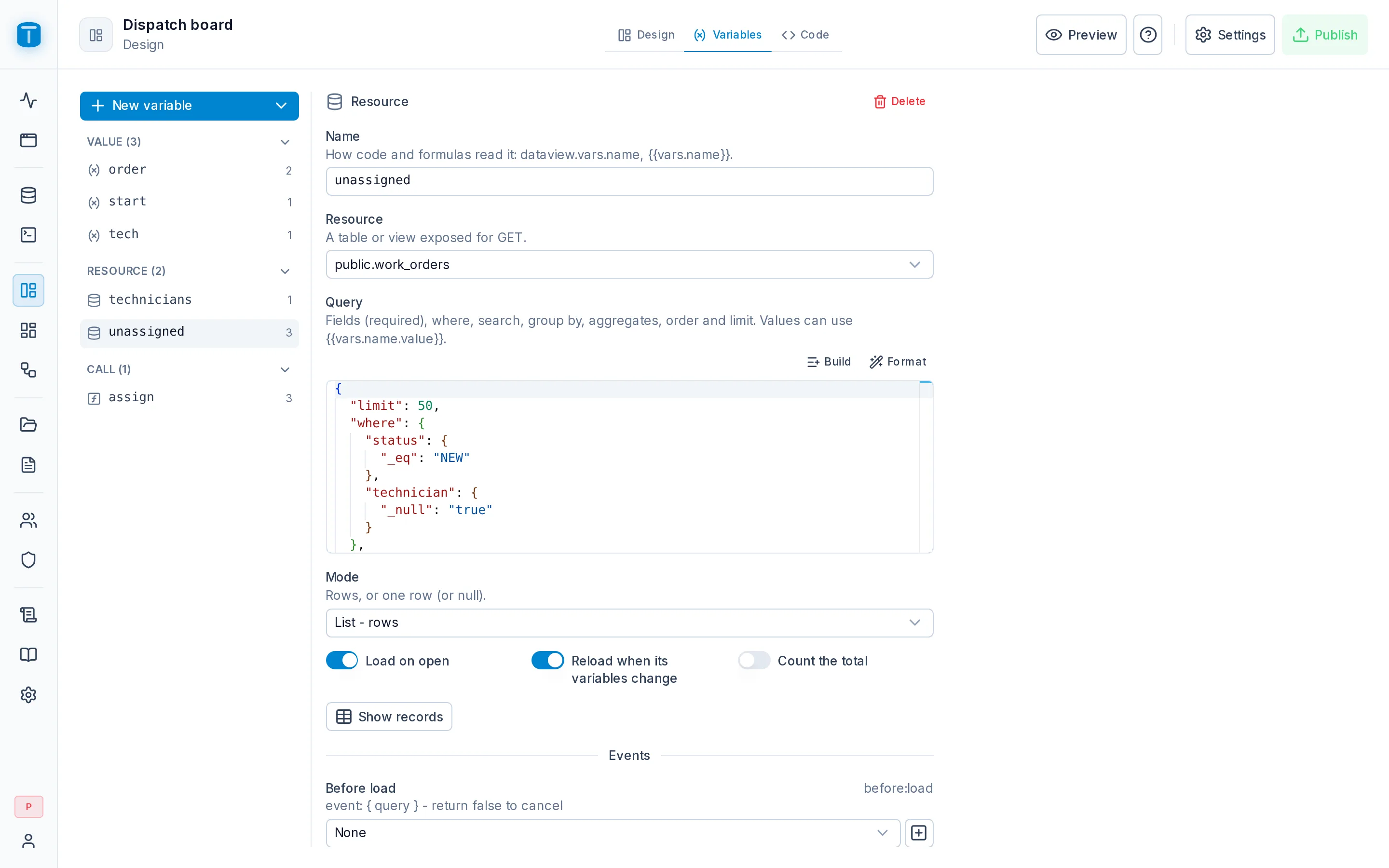
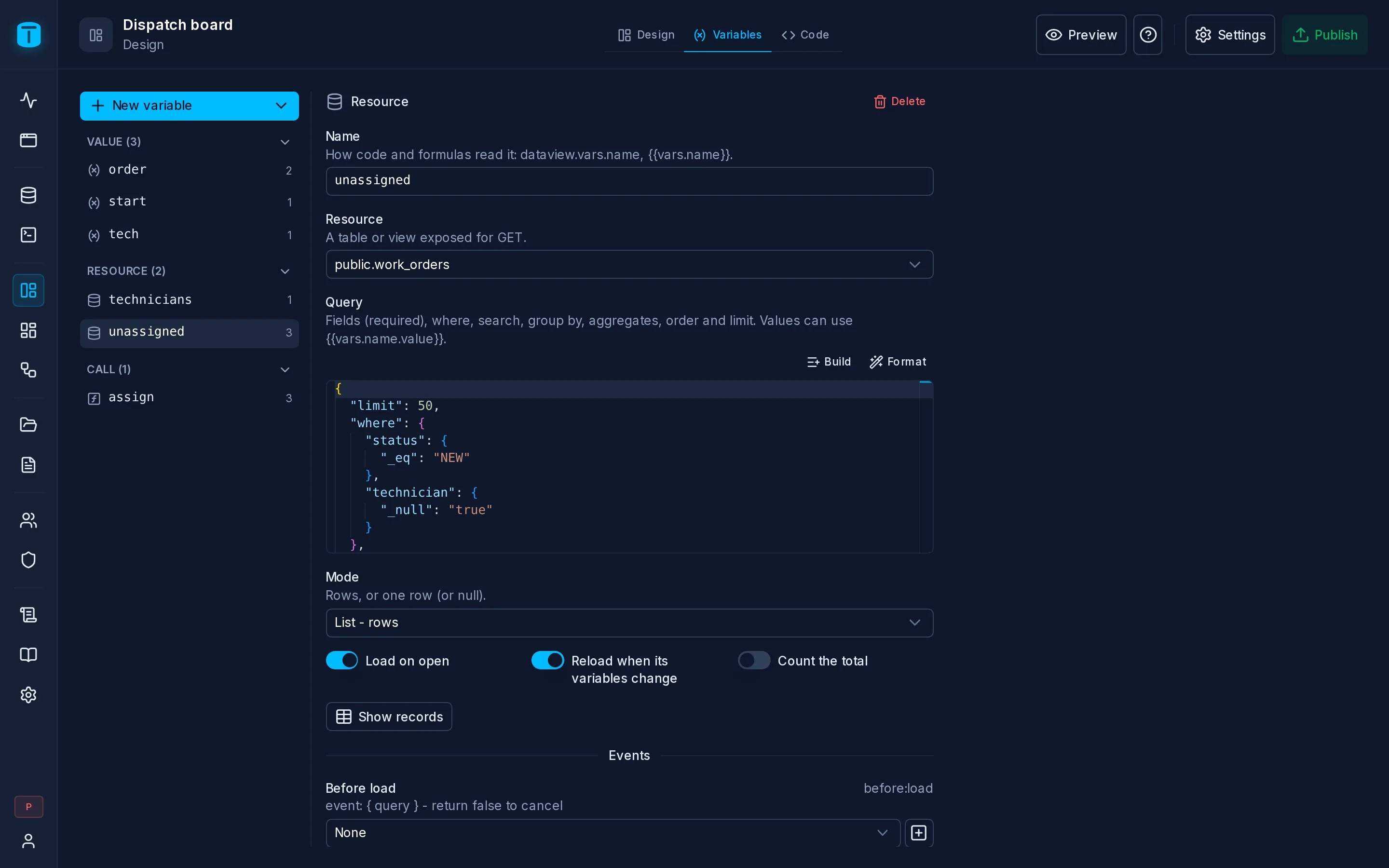
The Variables tab
On the left, the variables: record first, then the Values, Resources and Calls, each with how many widgets use it. A variable nothing uses is faded. On the right, the selected variable:
- its definition;
- Emits: each event it emits, with a function of the Code to call, and Create handler;
- Used by: the widgets and functions that reference it.
Renaming a variable updates the widgets bound to it, and warns you to rename it in the Code yourself: code is never rewritten for you. Deleting one that's in use asks first and says where.
Value
The page's state.
| Type | text, number, boolean, date, time, timestamp, date range, time range, list, JSON or point |
| Default | a constant, a formula (TODAY()), a parameter of the page's address, or a field of the user ($USER.branch) |
| State | value |
| Methods | set(value), reset() |
| Event | update:value, { value, previous }, whether a widget or code changed it |
A widget bound to a Value changes it, and every other widget and formula that reads it follows. A date range holds either a calendar period (this month) or two dates; in a Resource's filter, a period is computed by PostgreSQL.
Resource
Rows read through the Data API, as the user.
| Resource | a table or a view exposed for GET |
| Query | fields (required), where, search, order_by, limit, and grouping and aggregates. Built with the query builder or written as JSON |
| Mode | list (rows) or record (one row or nothing) |
| Immediate, Watch, Count | load when the page opens; reload when a variable its query uses changes; ask for the total |
| State | data, status, error, count, page, limit, search |
| Methods | refresh(), execute(), clear(), setFilter(), clearFilter(), setSearch(), setOrder(), setPage(), find(column, value) |
| Events | before:load (return false to cancel), load, error, update:data |
Show records runs the query as you, so you see what it returns.
The Dispatch board's free technicians:
{
  "fields": "id,user.name,color",
  "where": {
    "branch": { "_eq": "{{vars.branch.value}}" },
    "active": { "_eq": "true" }
  },
  "order_by": "user.name",
  "limit": 50
}
- Values are bound, never pasted into the query.
{{vars.branch.value}}is sent as a parameter, like any filter value from a client. A value starting with$is refused, so a user can't turn a text into$USER.*. - An unset value is no filter. While no branch is chosen, that condition is left out and every branch shows. An empty filter widget shows everything.
- All or nothing. If the user may not read a column the query names, the whole Resource fails, rather than silently dropping it. The Design form warns beforehand, naming the roles that open the DataView but lack the grant.
- Latest wins. A slow response older than the latest request is discarded.
- Data only. A Resource doesn't say how its rows look: two widgets on the same Resource share its rows, page and search, and each shows them its own way.
Call
Something the page runs, as the user.
| Target | a function (EXECUTE), a MANUAL workflow (permission to invoke it), or a table with an action: create, update or delete |
| Input | the request body as the API takes it: { "data": { ... } }; an update or a delete also names its row, by pk or by where. Values can use {{vars.*}} |
| State | data (the last result), status, error |
| Methods | execute(input?), setInput(), clear() |
| Events | before:execute (return false to cancel, or an object to replace the input), success, error, complete |
The Dispatch board's assign call runs the function assign_work_order, which assigns the order and schedules its visit in one transaction:
{
  "data": {
    "p_work_order": "{{vars.selectedOrder.value}}",
    "p_technician": "{{vars.technician.value}}",
    "p_start": "{{vars.start.value}}"
  }
}
A Call goes through the same routes as any client: functions through /api/{schema}/function/{name}, workflows through /api/workflows/{slug}/run, table writes through the Data API, with row filters, payload checks, audit and events. A page never has a write path of its own.
A failed call keeps the API's errors in error, and execute() rejects with the first error's message. A function that returns a file opens it with dataview.openFile(result).
record
A page with a record (a record form, a Form, a Master-detail, or a Custom page with a record table) has record: one row, loaded, edited and saved through the Data API.
| State | data (the row, edits included), mode (create, edit or view), dirty, status, error, pk |
| Methods | save(values?), cancel(), new(values?), open(pk), reload() (drops edits), refresh() (keeps edits, shows what a trigger recomputed), delete(), edit(), clone(), close(), set(column, value), canEdit(column) |
| Events | load, before:save (return false to cancel), save |
- What a save sends: on a new record, every value set; on an existing one, only what changed. A refused save leaves the record as it was and shows PostgreSQL's reason on the field.
- Live, never copied: which columns the user may read and write, which are required, a
CHECKlist's values, are read each time the page opens. - A form field bound to a column edits
record.data.<column>.
The page's address opens a row with ?pk=; without it, the page starts a new record.
Next steps
- Code: handle the variables' events and call their methods.
- Query language: the filter grammar a Resource's
whereuses.