

Data
In the admin: DataViews › a DataView › Settings › Data
Data is what the DataView reads from its source: which columns, in which order, and which rows. Everything here becomes one Data API request, which Query shows you.
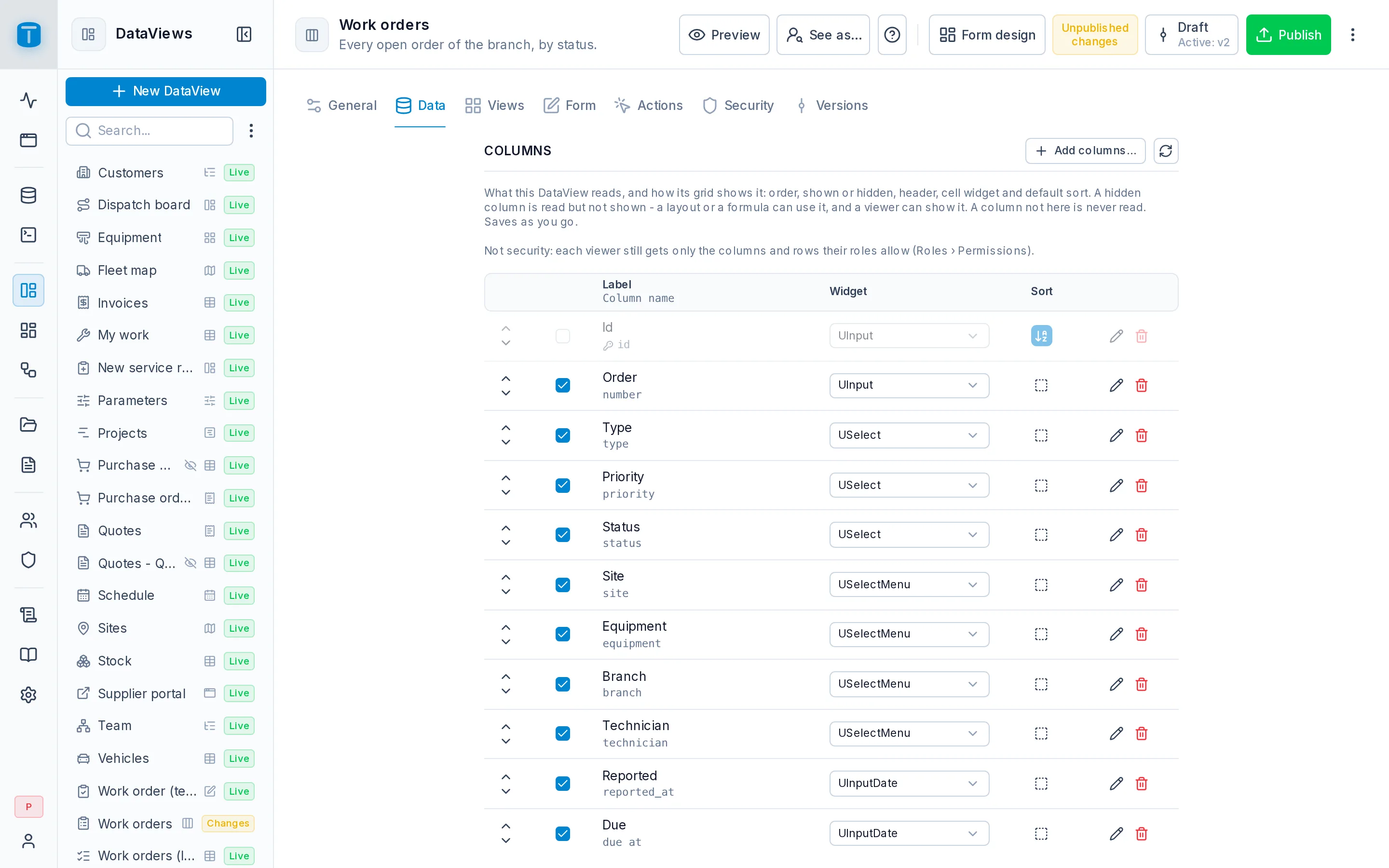
Columns
The DataView's columns are the columns it reads. Each row in the list shows the column's title with its name under it, and:
- a checkbox to show it or hide it. A hidden column is read but not shown: a layout (a calendar's date, a kanban's lane), a formula or an export can use it, and a user can show it from the grid's Columns menu.
- Sort, to make it part of the default order. Click to sort ascending, again for descending, again to remove it. Several columns sort in the order you click them.
- Move up and Move down, for the grid's order.
A column that isn't in the list is never read at all. That is different from hidden: to keep a column away from a DataView, leave it out.
The primary key is always in the DataView, because editing and deleting a row need it. You can hide it, not remove it.
A column's panel
Click a column's title to open its panel:
| Tab | |
|---|---|
| Properties | what this DataView does with the column: the cell's Widget, a Total, Truncate (one line, the whole value on hover), a Copy button in the cell |
| From the column | how the column reads everywhere: its label, format, styles and conditions, read-only, with a preview, how many DataViews show it, and Edit in the table |
Its title, format and colors aren't the DataView's: they're the column's, set once on its table and used by every DataView. Edit in the table opens the column's own panel over the page. See Tables › Column presentation.
At the panel's foot, Remove from the DataView stops reading the column. Add columns… brings it back.
Add columns…
Add columns… opens a sidebar with the source's columns that aren't in the DataView yet, with a search. Under each foreign key, the columns of the table it points at.
Picking one of those adds a related column: on Acme's Work orders, site.address shows each order's site address as a column of its own. A related column:
- is read-only, since it changes by picking another site;
- sorts, filters and is searched by its path;
- reaches one table away, through a foreign key of the source.
READ field grant on the path (site.address) to see it; without one, the column is left out for that role. The list warns when a role that opens the DataView lacks the grant, naming it. See Granting permissions.A foreign key column itself shows the related row by its table's row display (a site by its name) and keeps the key underneath for editing and linking. A role without the grant on the shown column sees the key.
Totals
A column's Total is shown at the foot of a Table: Sum, Average, Minimum, Maximum or Count. A number column offers all five, any other column Count.
A total covers every row the filters keep, not just the page, and is computed by PostgreSQL in the column's format: Sum: 1,234.00. It follows the user's filter and search, and needs READ on the column.
Sync columns
Sync columns compares the DataView with the table as it is now, after changes made in the SQL Console or another tool:
- a renamed column keeps its place, its settings and its bindings, because DataViews follow a column by its position in the table, not its name;
- a new column is added according to the column set below;
- a column that was dropped is reported, never deleted. Remove the field from the form yourself if you no longer need it.
A column you removed from the DataView stays out.
Scope
Column set
What happens to a column added to the table later:
| Option | |
|---|---|
| Auto-hide new columns | It joins the DataView hidden: read, not shown, until someone shows it. The default |
| Auto-show new columns | It joins visible right away |
| Lock to selected columns | It stays out. Add columns… can still bring it in |
Filter
A permanent filter, in the query language: Closed orders reads only {"status": {"_in": "COMPLETED,CANCELLED"}}. It's combined with AND with whatever the user filters and searches, so a user can narrow it but never see past it.
Query
Query shows the request the DataView makes to the Data API: fields from its columns, where from its filter, order_by from its default sort. Show records runs it with your permissions. A user's own permissions can narrow it further.
GET /api/public/table/work_orders
  ?fields=id,number,status,priority,site,technician,due_at
  &where[status][_in]=COMPLETED,CANCELLED
  &order_by=-due_at
When a column is gone
A column renamed or dropped outside TotalBase can break what still names it: a layout's column (a calendar's date), a formula's {{column}}, the filter. TotalBase checks them against PostgreSQL's catalog:
- the DataView shows an error icon in the admin's list, saying what's missing;
- the table's Columns tab in Database lists the DataViews and dashboard widgets that name it, each linking to where it's fixed;
- Sync resources in Database warns about them.
A Custom page's record table
A Custom page's Data section holds its Record table: the table whose row the page edits, if any. It can be set once, and then stays. See Custom.
Next steps
- Views: how a list shows its rows.
- Tables › Column presentation.