

Manual
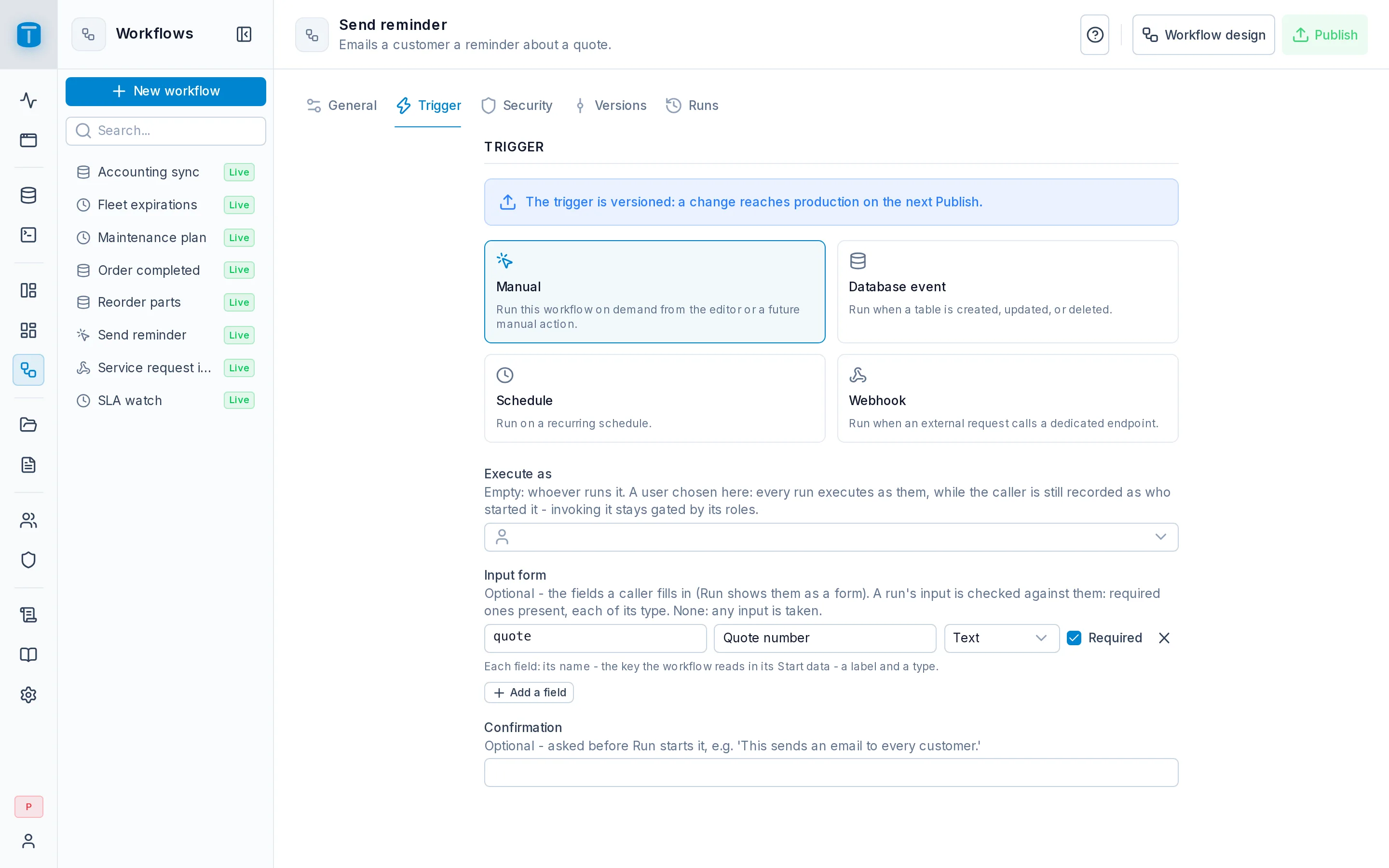
In the admin: Workflows › a Workflow › Settings › Trigger
A Manual workflow runs when someone asks for it: an administrator in the editor, a user clicking a DataView action or a button on a page of the App, a program calling the API, or another workflow. Whoever starts it needs the workflow's invoke grant.
At Acme, Send reminder is a Manual workflow behind an action on the Customers DataView: a sales rep selects customers and clicks it.
Configuration
All three fields are optional. With none, any input is taken and the run executes as whoever started it.
| Field | |
|---|---|
| Execute as | Empty: the run executes as whoever runs it. A user chosen here: every run executes as them, while the caller is still recorded as who started it. Invoking it still needs the invoke grant |
| Input form | The fields a caller fills in. Each has a name (the key the workflow reads in {{start.data.<name>}}), a label, a type (Text, Number, Yes / no, Date) and Required. Add a field adds one |
| Confirmation | A question asked before Run › Production starts it, such as This sends an email to every customer. |
A field's name is letters, digits and underscores, not starting with a digit, and unique in the form.
Execute as lets a caller with narrow permissions start a run that needs wider ones, without giving them those permissions anywhere else. A dispatcher may start a workflow that writes invoices, though only Accounting may write them, if it executes as an Accounting user. Choose that user deliberately: whatever the workflow's steps do, they do with that user's permissions.
The input form
When a workflow has an input form, every run's input is checked against it before anything runs: it must be an object, with every required field present and every value of its type. A Date is YYYY-MM-DD. Otherwise the run is refused with 422 WORKFLOW_VALIDATION_FAILED, one sentence per field.
In the editor's Run modal the form replaces the JSON editor. Without a form, any input is taken, null included.
Starting it
| From | How |
|---|---|
| The editor | Run › Production, once published and enabled. Run › Test runs the draft. See Editor |
| A DataView | A custom action on a row, a record or a selection |
| A page of the App | A Call variable whose target is the workflow. See Variables |
| Another workflow | The Execute another workflow step |
| A program | POST /api/workflows/{slug}/run |
A custom action without arguments sends the row's key, { "id": "…" }, or, from the selection bar, the selected keys, { "ids": ["…", "…"] }. With arguments, it sends what you mapped. Either way, the workflow reads it in {{start.data}}.
The API
curl -X POST "$TOTALBASE_URL/api/workflows/send-reminder/run" \
  -H "Authorization: Bearer $TOKEN" \
  -H "Content-Type: application/json" \
  -d '{ "data": { "ids": ["3b0e…", "91ac…"] } }'
The caller is a signed-in user or an API token. The run is synchronous: the answer comes when it ends.
{ "data": { "id": "7d2f…", "status": "SUCCEEDED", "result": { "sent": 2 }, "error": null } }
result is what the workflow ended with: its Finish with result step, or the last step's result. A failed run still answers 200, with status FAILED and its error. The steps are never returned: you decide what callers get through the Finish step.
With ?async=true the answer is 202 as soon as the run starts, with status RUNNING. Poll its outcome with:
GET /api/workflows/runs/7d2f…/result
which answers the same { id, status, result, error }. A caller can read only runs it started itself, while they run and for 24 hours after they finish, and only while it still holds the invoke grant. Anything else is 404 WORKFLOW_RUN_NOT_FOUND.
The run route takes no Idempotency-Key: calling it twice starts two runs.
| Code | When |
|---|---|
404 WORKFLOW_NOT_FOUND | no such workflow, or it isn't published, isn't enabled, or isn't Manual or Schedule. All look the same, so callers can't probe which workflows exist |
403 ACTION_DENIED | none of the caller's roles has the invoke grant |
422 WORKFLOW_VALIDATION_FAILED | the input doesn't match the input form |
The OpenAPI document lists, for each caller, the run path of every workflow it may invoke.